

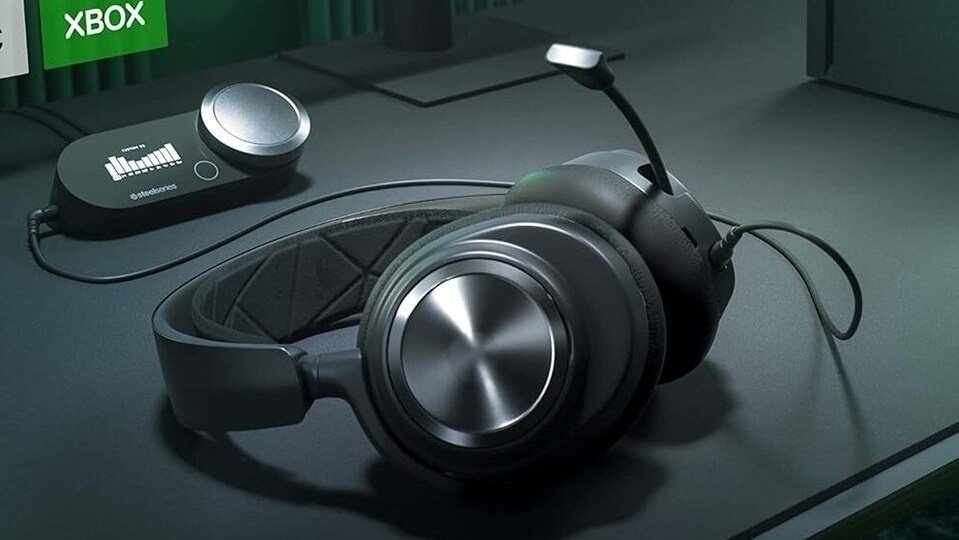
While headphones usually prioritize how well you hear, having a high-quality microphone ensures you sound just as good.
Modern headsets feature advanced noise-rejection technology, cardioid pickup patterns, and acoustic tuning designed specifically to pull your voice out of background chaos.
Best Communication Headsets at a Glance
| Headset | Best For | Microphone Type | Key Benefit |
| HyperX Cloud Stinger 2 | Budget & Work | Swivel-to-Mute | Extremely lightweight (275g), highly articulate vocal profile |
| Razer BlackShark V2 X | Noisy Environments | HyperClear Cardioid | Suppresses ambient rear/side noise; ultra-clear mids |
| Sony INZONE H6 Air | Dual PC / Console Use | Flip-to-Mute Boom Mic | High-fidelity voice reproduction with deep spatial sound |
| SteelSeries Arctis Nova Pro | Audiophiles & Creators | ClearCast Gen 2 | Retractable broadcast-grade mic with dedicated GameDAC Gen 2 |
Feature Breakdown: Top Headsets for Vocal Clarity
Best Overall Value: HyperX Cloud Stinger 2
You don’t need to spend a fortune to fix a muffled voice. The HyperX Cloud Stinger 2 features an excellent directional microphone paired with a highly practical swivel-to-mute function—just flip the mic arm up out of your face to instantly cut your audio during a call.
-
Pros: Very comfortable for long work shifts or gaming sessions, spatial audio support, affordable.
-
Cons: Wired-only layout; native bass tuning is a bit flat for music lovers.
Best for Background Noise Cancellation: Razer BlackShark V2 X
If you work in a loud room or travel frequently, the BlackShark V2 X is a lifesaver. Its HyperClear Cardioid mic focuses intensely on a tight sweet spot right in front of your mouth, isolating your voice while naturally muting distracting sounds from the sides and back of your room.
-
Pros: Incredible noise rejection, light 240g chassis, excellent positional 7.1 audio on PC.
-
Cons: The microphone is fixed to the headset and cannot be detached when you just want to listen to music.
Best Premium Multi-System Choice: Sony INZONE H6 Air
Built to handle seamless transitions between intense work calls on a PC and late-night sessions on a PlayStation 5, this ultra-lightweight headset features a high-fidelity boom mic. The microphone emphasizes vocal clarity, eliminating the “underwater” sound typical of cheap laptop or webcam mics.
-
Pros: Immersive 360 Spatial Sound, smooth integration across Windows and PlayStation platforms.
-
Cons: Premium pricing tier; relies entirely on a wired connection.
Best Broadcast & Creator-Grade Setup: SteelSeries Arctis Nova Pro Wired
For remote professionals, podcasters, and serious streamers who demand perfection, this headset features a ClearCast Gen 2 microphone. It uses a bidirectional design (the same pattern utilized by broadcast television crews) to offer studio-grade clarity. It plugs into an included external GameDAC Gen 2 unit that processes your audio cleanly before it ever reaches your computer.
-
Pros: Audiophile-grade Hi-Res certified sound drivers, fully retractable microphone hides inside the earcup when not in use.
-
Cons: Significantly higher financial investment; the desktop DAC unit takes up extra workspace.
Smart Tips to Eliminate Muffled Call Audio
-
Mind the Distance: Keep your boom microphone roughly 1 to 2 inches away from your mouth, aligned just below your lower lip. Placing it directly in front of your lips will cause heavy “popping” noises from your breath (plosives).
-
Check Your Software Settings: High-quality microphones can sometimes be choked out by aggressive, overlapping noise suppression apps (like running Zoom’s background noise filter at the same time as Windows mic compression). If you sound robotic or artificially quiet, try lowering your communication app’s internal noise suppression.
